TRANSLATION / Google Translate
A camera overlay can make unfamiliar text easier to approach. Its usefulness depends on image clarity, context and your willingness to verify the words that affect a decision.
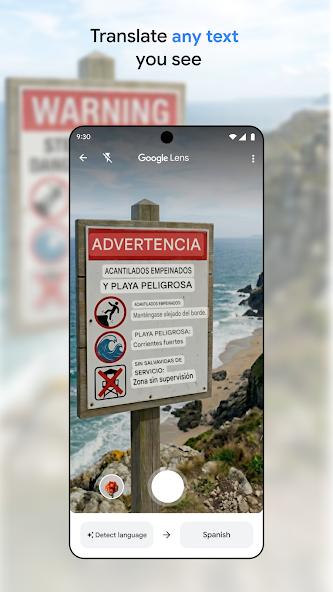
Give the camera a readable subject
Frame the text straight on where possible and avoid glare, motion and deep shadow. Decorative lettering and several columns can make reading order unclear. If a live view is unstable, a clear still image may be easier to inspect. Check that the application has recognised the intended words rather than treating a partial sign as the whole message.
Separate recognition from translation
There are two opportunities for error: reading the characters and interpreting them. A wrong number or missed negative can matter more than an awkward sentence. Compare quantities, dates, times and place names with the source image. If a key word is unclear, isolate it or type the visible text instead of treating the fluent-looking overlay as confirmation.
Use context to ask a better question
A menu heading, train notice and museum label require different kinds of understanding. Translate a complete relevant phrase where possible. Do not assume an isolated word carries the same meaning everywhere. For a purchase or route choice, ask a staff member to confirm the specific detail rather than asking whether the entire automated translation is correct.
Know when to stop relying on the tool
Safety warnings, allergy information and binding terms deserve direct confirmation through an appropriate human source. A translation app can help identify what to ask, but it should not be the only basis for a consequential decision. Also consider privacy: avoid pointing the camera at personal documents or other people's information when a less revealing input will answer the question.
A small check to try
- Avoid glare and incomplete framing.
- Double-check numbers, negatives and names.
- Confirm consequential details with an appropriate person.